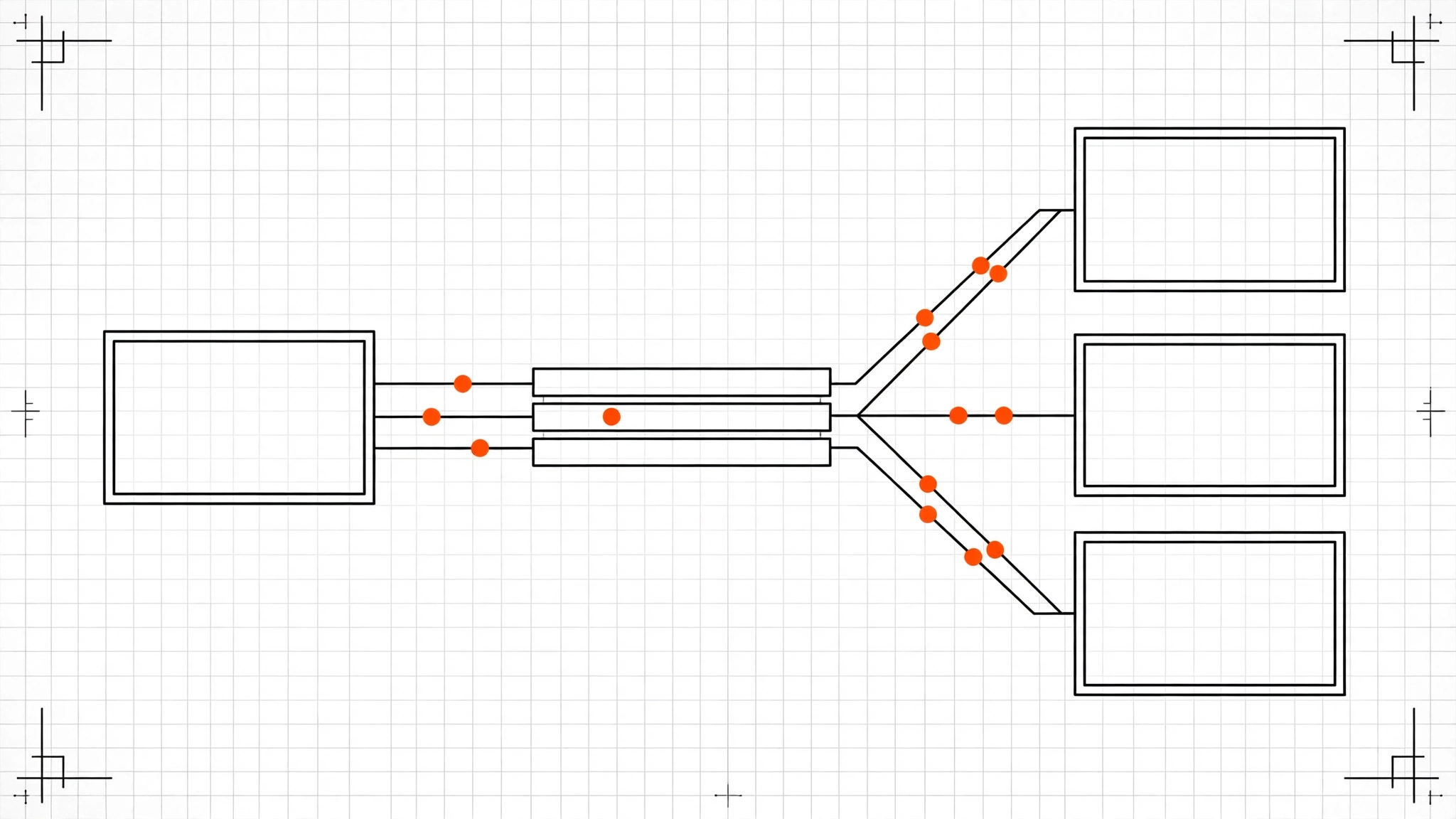
Your self-hosted n8n runs fine for months — then a busy morning hits, webhooks start timing out, and the UI takes ten seconds to load. Nothing in your workflows changed; the volume did. Queue mode is n8n’s answer to that exact moment: instead of the main instance executing every workflow itself, it hands executions to a Redis queue and lets separate worker processes run them. By the end of this guide you will know whether you need queue mode at all, how the moving parts fit together, and have a working Docker Compose setup you can paste into your own server.
Queue mode is an n8n execution mode (EXECUTIONS_MODE=queue) where the main instance only orchestrates — receiving webhooks, running the scheduler, serving the UI — while dedicated worker processes pull jobs from a Redis-backed queue and execute them. A worker is an n8n process that runs workflow executions but serves no web traffic. Redis (via the Bull queue library) is the message broker sitting between them.
Do you actually need it? Probably not yet
Queue mode adds moving parts, and moving parts break. Here is the honest decision table before you touch a config file:
| Your situation | Verdict |
|---|---|
| A few hundred executions a day, mostly scheduled | Stay on regular mode. Queue mode buys you nothing. |
| Prototypes, one or two users | Stay. Simplicity wins. |
| Webhooks timing out under bursts, UI sluggish during heavy runs | Queue mode helps — executions leave the main process. |
| Long-running workflows (minutes to hours) blocking everything else | Queue mode helps — workers absorb the long tail. |
| Thousands of executions a day, multiple teams | Queue mode. This is what it is for. |
One signal beats every other: open your n8n instance during a busy period. If executions sit in “waiting” while CPU is pegged and the editor lags, your single process is the bottleneck. If everything is idle 90% of the day with occasional spikes, a bigger single container is cheaper and simpler than a queue cluster.
Queue mode increases throughput, not speed. One workflow that takes 30 seconds still takes 30 seconds. What changes is that ten of them can run at once without starving the web UI — because ten workers run them, not one overloaded main process.
How the pieces fit together
Regular mode is one process doing everything: answering HTTP, firing timers, running executions. Queue mode splits that into three process types:
                ┌─────────────┐
                │    main     │  timers, scheduler, UI/API
                │  n8n start  │  (NOT in the load-balancer pool)
                └──────┬──────┘
                       │ jobs
                       ▼
                ┌─────────────┐
                │    Redis    │  Bull queue: pending executions
                └──────┬──────┘
                       │ pull
        ┌──────────────┼──────────────┐
        ▼              ▼              ▼
   ┌─────────┐   ┌─────────┐   ┌─────────┐
   │ worker  │   │ worker  │   │ worker  │  n8n worker
   └─────────┘   └─────────┘   └─────────┘  --concurrency=N
Inbound HTTP gets its own lane too. Webhook processors (n8n webhook) are lightweight processes that only accept webhook calls and push them into the queue. Behind a reverse proxy or load balancer you route /webhook/* and /webhook-waiting/* to the webhook pool and everything else to the main instance — and you never put the main instance in the load-balancer pool for webhooks, or bursts hit the orchestrator directly.
Two hard requirements, both non-negotiable:
- Postgres, not SQLite. Queue mode requires an external database (
DB_TYPE=postgresdb). SQLite cannot be shared between processes. - One shared encryption key. Every process — main, workers, webhook processors — must use the same
N8N_ENCRYPTION_KEY. If a worker boots with a different key, credentials become unreadable and executions fail with cryptic decryption errors.
Prerequisites
- A server with Docker and Docker Compose (the Docker setup guide pattern from our 3.0 migration post applies — queue mode assumes you are already on Docker).
- n8n 2.41.4 or newer (as of October 1, 2026). Queue mode’s flags below are stable across the 2.x line.
- Ports: 5678 for the n8n UI (behind your reverse proxy in production).
Placeholder terminology — replace these in every command and config below:
<db-password>— a long random password for the Postgresn8nuser<encryption-key>— a 32+ character random string, identical on every n8n service
Generate them once and reuse:
openssl rand -hex 24Run it twice — one value becomes the database password, the other the encryption key. Save both in your password manager before continuing.
Step 1 - Stand up Postgres and Redis
These two services are the shared foundation. Postgres holds workflows, credentials, and execution records; Redis holds the live queue.
services:
  postgres:
    image: postgres:17
    restart: unless-stopped
    environment:
      POSTGRES_DB: n8n
      POSTGRES_USER: n8n
      POSTGRES_PASSWORD: <db-password>
    volumes:
      - pgdata:/var/lib/postgresql/data

  redis:
    image: redis:7-alpine
    restart: unless-stopped
    volumes:
      - redisdata:/data
Why Postgres 17 and not 18: as of October 2026, n8n supports the two latest active Postgres majors plus one compatibility major — 17 is the safe, boring choice, and 18 changed its default data directory (missing PGDATA starts you with an empty database). Boring is a feature for your queue’s database.
Warning: Queue mode’s Redis is a single point of failure. If Redis goes down, no executions start. For anything where downtime costs money, run Redis in a replicated setup (Redis Sentinel or your cloud provider’s managed Redis) rather than this single container.
Step 2 - Configure the main instance
The main instance keeps the same job it always had — timers, the scheduler, the editor UI, the API — minus execution. One environment variable makes the switch:
  n8n-main:
    image: n8nio/n8n:2.41.4
    restart: unless-stopped
    command: start
    environment:
      - EXECUTIONS_MODE=queue
      - N8N_ENCRYPTION_KEY=<encryption-key>
      - DB_TYPE=postgresdb
      - DB_POSTGRESDB_HOST=postgres
      - DB_POSTGRESDB_PORT=5432
      - DB_POSTGRESDB_DATABASE=n8n
      - DB_POSTGRESDB_USER=n8n
      - DB_POSTGRESDB_PASSWORD=<db-password>
      - QUEUE_BULL_REDIS_HOST=redis
      - QUEUE_BULL_REDIS_PORT=6379
      - N8N_HOST=0.0.0.0
      - N8N_PORT=5678
      - WEBHOOK_URL=https://n8n.example.com/
    ports:
      - "5678:5678"
    depends_on:
      - postgres
      - redis
    volumes:
      - n8n-data:/home/node/.n8n
Here’s what each key does:
EXECUTIONS_MODE=queue— the switch itself. The main instance stops executing workflows and starts enqueueing them.N8N_ENCRYPTION_KEY— must be identical on every n8n service. This encrypts your stored credentials. A mismatched key is the single most common queue-mode setup failure.DB_TYPE+DB_POSTGRESDB_*— points all processes at the shared Postgres. Queue mode refuses to start on SQLite.QUEUE_BULL_REDIS_HOST/PORT— where the Bull queue lives. Every process must reach the same Redis.WEBHOOK_URL— the public URL n8n uses to register webhook URLs. Set it to your real domain or webhook registrations silently point at the wrong host.- The
n8n-datavolume holds config and keys on the main instance; workers are stateless and do not need it.
Step 3 - Add the workers
Workers are the same image with a different command. Scale by running more of them:
  n8n-worker:
    image: n8nio/n8n:2.41.4
    restart: unless-stopped
    command: ["worker", "--concurrency=10"]
    environment:
      - EXECUTIONS_MODE=queue
      - N8N_ENCRYPTION_KEY=<encryption-key>
      - DB_TYPE=postgresdb
      - DB_POSTGRESDB_HOST=postgres
      - DB_POSTGRESDB_PORT=5432
      - DB_POSTGRESDB_DATABASE=n8n
      - DB_POSTGRESDB_USER=n8n
      - DB_POSTGRESDB_PASSWORD=<db-password>
      - QUEUE_BULL_REDIS_HOST=redis
      - QUEUE_BULL_REDIS_PORT=6379
    depends_on:
      - postgres
      - redis
--concurrency=10 is n8n’s default: each worker runs up to 10 executions at once. Start here and scale workers horizontally (two workers at concurrency 10 beat one at 20) — n8n’s own guidance is to keep concurrency at 5 or above per worker, and low concurrency multiplied across many workers can exhaust the database connection pool.
Start with one worker and add more only when the queue visibly backs up:
docker compose up -d --scale n8n-worker=3Note:
depends_ononly waits for the containers to start, not for Postgres to be ready to accept connections. If workers crash-loop on first boot, wait 30 seconds and rundocker compose up -dagain — Postgres was still initializing.
Step 4 - Add dedicated webhook processors
If webhooks are your bottleneck, give inbound HTTP its own processes:
  n8n-webhook:
    image: n8nio/n8n:2.41.4
    restart: unless-stopped
    command: ["webhook"]
    environment:
      - EXECUTIONS_MODE=queue
      - N8N_ENCRYPTION_KEY=<encryption-key>
      - DB_TYPE=postgresdb
      - DB_POSTGRESDB_HOST=postgres
      - DB_POSTGRESDB_PORT=5432
      - DB_POSTGRESDB_DATABASE=n8n
      - DB_POSTGRESDB_USER=n8n
      - DB_POSTGRESDB_PASSWORD=<db-password>
      - QUEUE_BULL_REDIS_HOST=redis
      - QUEUE_BULL_REDIS_PORT=6379
      - WEBHOOK_URL=https://n8n.example.com/
    depends_on:
      - postgres
      - redis
Then in your reverse proxy, route /webhook/* and /webhook-waiting/* to the webhook processors and everything else to n8n-main:5678. Without this split, a webhook flood still hammers the main instance — you would have built the queue and then aimed the firehose at the orchestrator.
Step 5 - Verify the whole thing works
Bring up the stack and check that every process registered itself:
docker compose up -d
docker compose ps
docker compose logs n8n-worker --tail=20
You should see the worker log lines showing it connected to Redis and is waiting for jobs. Then prove executions actually flow through workers: create a test workflow with a Webhook trigger and a 5-second Wait node, fire ten requests at it in parallel, and watch:
for i in $(seq 1 10); do
  curl -s -o /dev/null -w "%{http_code}\n" https://n8n.example.com/webhook/test-queue &
done
wait
All ten should return 200, and docker compose logs n8n-worker should show the executions being picked up. In the n8n UI, the executions list confirms each ran to success. If requests hang, check the webhook processor logs first; if executions stay queued, the workers are not reaching Redis.
The gotchas that bite in production
Filesystem binary storage does not work in queue mode. Binary data (files, images, PDFs) must live in shared storage — S3 or equivalent — because workers are separate processes that cannot see each other’s local disk. Point N8N_EXTERNAL_STORAGE_* at S3 before your first file-handling workflow runs in queue mode.
Large webhook responses travel through Redis. Since n8n 2.34, a worker’s large webhook response is relayed back to the main instance inside a Redis message, capped at 64 MiB by default (N8N_WEBHOOK_RESPONSE_RELAY_SIZE_MAX). Returning multi-hundred-megabyte payloads from webhooks will hit that ceiling — offload big responses to storage and return a link instead.
AI Agent workflows have queue-mode caveats. n8n’s own docs flag that queue mode is not yet fully supported for agent-style executions — if your heaviest workflows are AI agents, test them specifically under queue mode before migrating production traffic.
Debugging gets harder. Logs are now spread across main, workers, and webhook processors. Add a service label to each container’s logging and ship them to one place, or your first 2 AM incident will be a scavenger hunt.
Execution data still accumulates. Queue mode does not prune anything. Set EXECUTIONS_DATA_PRUNE=true with a sane EXECUTIONS_DATA_MAX_AGE (e.g. 168 hours), or Postgres grows until the disk fills — the least glamorous queue-mode outage there is.
FAQ
Does queue mode make my workflows run faster?
No. A single execution runs at the same speed. Queue mode raises throughput — how many executions run concurrently without degrading the UI, the scheduler, or webhook response times.
Can I run queue mode without Docker?
Technically yes — EXECUTIONS_MODE=queue works with any install that can run n8n worker as a separate process. Practically, Docker Compose is how everyone does it, and with npm installs deprecated ahead of n8n 3.0, Compose is the setup to learn.
How many workers do I need?
Start with one at the default concurrency of 10. Add workers when executions visibly wait in the queue during peaks. Two workers at concurrency 10 is a better first step than one worker at concurrency 20.
What happens if a worker crashes mid-execution?
Bull re-queues the job and another worker picks it up — but the workflow restarts from the beginning, not from where it crashed. Keep workflows idempotent (safe to re-run) if crashes are in your threat model.
Key Takeaways
- Queue mode splits orchestration from execution — the main instance handles webhooks, timers, and the UI; Redis-backed workers run the workflows.
- Postgres and a shared encryption key are non-negotiable — SQLite cannot work across processes, and a mismatched
N8N_ENCRYPTION_KEYsilently breaks credentials on workers. - Route webhooks to dedicated processors —
/webhook/*and/webhook-waiting/*go ton8n webhookprocesses, never to the main instance. - Binary data needs S3 in queue mode — filesystem binary storage is unsupported, and large webhook responses are capped at 64 MiB through Redis.
- Do not migrate for fun — if a single instance is idle most of the day, a bigger container beats a queue cluster on simplicity and debuggability.
Next: if you are still on an npm install, read our n8n 3.0 breaking changes checklist — 3.0 makes Docker mandatory, and queue mode is the natural architecture to land on once you migrate.